Key Fobs vs Mobile Credentials: Which Access Control Credential Is Best for Businesses?
Quick Answer
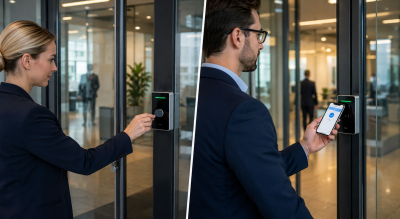
When comparing key fobs vs mobile credentials, there is no single solution that suits every business. For many organisations, traditional key fob access control still provides the best balance of speed, reliability and ease of administration. However, mobile credentials, digital keys and smartphone access control systems are becoming increasingly attractive, particularly where staff turnover, contractor management and cloud administration are important.
For high-security environments, biometric access control remains the gold standard, although cost often limits adoption outside specialist applications.
Why Businesses Are Replacing Traditional Access Control Credentials
The access control market has changed dramatically over the last decade.
Historically, most organisations relied on physical credentials such as key fobs, access cards and proximity tags. Today, modern access control systems can offer:
- Traditional key fobs and access cards
- Smartphone access control
- Mobile credentials
- Digital keys
- Facial recognition
- Fingerprint authentication
- Cloud-based access control platforms
Solutions such as Paxton10 Smart Credentials, Paxton Solo and Suprema Mobile Access are encouraging businesses to rethink how users gain access to buildings.
The question is no longer whether these technologies work.
The question is whether they offer a better balance of security, convenience, administration and cost than traditional credentials.
Having designed, installed and maintained access control systems across offices, schools, healthcare environments and commercial premises, I’ve found that the answer often depends less on technology and more on how people actually use the system.
Why Key Fobs Remain Popular in Commercial Access Control Systems
Despite the growth of smartphone access control, most customers still default to traditional key fobs.
There are several reasons why.
Key fobs are:
- Familiar
- Reliable
- Fast
- Easy to issue
- Easy to understand
Users simply present the credential and the door opens.
There is no application to download, no onboarding process and no concern about battery life.
Biometric solutions are frequently discussed during the design process, particularly fingerprint readers and facial recognition systems. However, they are often ruled out due to the significantly higher cost of hardware and implementation.
Digital credentials are different.
Many customers immediately like the idea of carrying a single device rather than a separate key, fob or access card.
The concept is attractive, but the reality is often more complicated than expected.
Key Fob vs Mobile Credential vs Biometrics Comparison
| Feature | Key Fobs & Cards | Mobile Credentials | Biometrics |
|---|---|---|---|
| Initial Cost | Low | Medium | High |
| Entry Speed | Excellent | Good | Excellent |
| Security | Good | Very Good | Excellent |
| Credential Management | Good | Excellent | Excellent |
| User Training Required | Minimal | Moderate | Moderate |
| Lost Credential Risk | Moderate | Low | Very Low |
| Cloud Management | Limited | Excellent | Good |
| Best For | Offices, Schools, Factories | Modern Workplaces, Multi-Site Organisations | High-Security Applications |
The True Cost of Key Fob Access Control
A common assumption is that physical credentials generate significant replacement costs.
In practice, office staff rarely lose their access credentials.
What they frequently do is forget them.
This is particularly common in organisations that combine printed ID cards and access control credentials. Forgotten cards often result in temporary credentials being issued, creating additional administration for facilities and security teams.
Visitor and contractor credentials are usually a much bigger challenge.
For many organisations, visitor and contractor tokens create a constant cycle of:
- Purchasing
- Programming
- Issuing
- Collecting
- Replacing
These ongoing management requirements can become a significant hidden cost within any credential management strategy.
Lost credentials also represent a potential security concern.
In schools, factories and public-sector environments, a missing credential can create a window of vulnerability before it is reported and disabled. Although this risk is considerably lower than losing a physical key, it is still something businesses must consider.
Access Control for Schools, Healthcare and Commercial Buildings
Different sectors purchase access control systems for different reasons.
Schools, healthcare facilities and large commercial estates often operate extensive master-keyed or keyed-alike lock systems. In these environments, a lost key can become a major operational and security problem.
One of the biggest advantages of electronic access control credentials is the ability to revoke access instantly without replacing physical hardware.
Office environments typically have different priorities.
Many organisations are more interested in:
- Fire roll call reporting
- Occupancy monitoring
- Staff attendance tracking
- Ease of administration
- Flexible permissions management
Security remains important, but convenience often becomes the primary purchasing driver.
Are Mobile Credentials Better Than Key Fobs?
This is one of the most frequently asked questions in the access control industry.
My answer is usually simple:
Mobile credentials are different, not necessarily better.
A modern mobile access control system can provide significant advantages.
These include:
- Remote credential issuance
- Instant credential revocation
- Reduced physical token management
- Improved user auditing
- Support for remote administration
For organisations managing multiple sites, large contractor populations or frequent staff turnover, these benefits can be substantial.
However, mobile credentials also introduce new challenges.
Do Mobile Credentials Work Like Apple Pay?
One of the biggest misconceptions surrounding mobile access credentials is that they work exactly like mobile payment technologies such as Apple Pay or Google Pay.
Customers often assume they can simply hold their phone near a reader and immediately gain entry.
The reality varies significantly depending on:
- Manufacturer
- Reader technology
- Mobile operating system
- Device settings
- Credential type
Some solutions require the phone to be unlocked.
Some require an application to run in the background.
Others behave differently depending on whether the user has an Android device or an iPhone.
Every additional action adds time to opening the door.
While the delay may only be a few seconds, it becomes increasingly noticeable where large numbers of users arrive simultaneously.
This remains one area where key fob access control often maintains an advantage.
Are Mobile Credentials Easier to Manage Than Key Fobs?
Many suppliers position digital credentials as a way of eliminating administration.
The reality is more balanced.
Mobile credentials remove the need to:
- Replace lost cards
- Print credentials
- Issue physical tokens
However, somebody still needs to:
- Assign credentials
- Invite users
- Configure permissions
- Support onboarding
- Manage phone changes and upgrades
In many cases, organisations simply exchange one type of administration for another.
A traditional fob can often be programmed, handed to a user and explained in under a minute.
A digital credential may require setup, registration and user training before it can be used effectively.
Paxton Solo Review: Is It Better Than Traditional Access Control?
Paxton Solo represents a new generation of cloud-based access control.
Unlike traditional systems, it is designed around smartphone credentials from the outset.
For:
- Single-door offices
- Small businesses
- Remote buildings
- Digital-first organisations
Paxton Solo can be an attractive alternative to conventional access control.
Businesses willing to embrace a completely digital credential strategy may find Solo provides an appealing combination of simplicity, convenience and cloud-based management.
Are Paxton10 Smart Credentials Worth It?
When organisations specifically require cloud-based access control, Paxton10 is often one of the strongest solutions available.
By combining:
- Access control
- Video surveillance
- Smart credentials
- Cloud management
within a single platform, Paxton10 provides a highly capable solution for growing organisations and multi-site deployments.
For many businesses seeking a modern mobile access control system, Paxton10 remains one of the benchmarks against which competing products are measured.
Suprema Mobile Access: A Flexible Digital Credential Solution
In my experience, Suprema Mobile Access is particularly attractive in environments with:
- High staff turnover
- Frequent contractors
- Large visitor populations
- Rapid onboarding requirements
The ability to issue and revoke digital access credentials remotely offers genuine operational benefits.
One particularly effective approach is integrating Suprema readers with an existing Paxton Net2 system, allowing organisations to support:
- Traditional fobs
- Mobile credentials
- Mixed user requirements
This hybrid approach often provides the greatest flexibility while minimising disruption to existing users.
Best Access Control System for a 40-Person Office
This answer surprises many people.
If a customer approached me with:
- One office entrance
- Approximately 40 staff
- No planned expansion
my recommendation would still be:
A computer-managed Paxton Net2 system using encrypted key fobs.
The reason isn’t because newer technology isn’t available.
It’s because Net2 remains one of the most mature and effective office access control systems available today.
The platform offers excellent:
- User administration
- Reporting
- Occupancy monitoring
- Fire roll call functionality
- Access management
For a typical office environment, these benefits often outweigh the advantages of moving completely to smartphone credentials.
That recommendation changes once staff turnover increases or contractor management becomes a higher priority.
In those cases, mobile credentials start becoming much more compelling.
The Future of Access Control: Digital Credentials, Biometrics and AI
Over the next five years, I expect digital credentials and mobile access control systems to become increasingly mainstream.
As platforms mature and onboarding becomes easier, the administration benefits of smartphone credentials will become more attractive to organisations of all sizes.
Looking ten years into the future, however, we may not be discussing phones versus fobs at all.
Advances in:
- Artificial intelligence
- Video analytics
- Biometric authentication
- Presence detection
- Voice interaction
could eventually remove the need for a credential entirely.
Rather than presenting a card or smartphone, individuals may simply be recognised and authenticated automatically by intelligent building management systems.
If that future arrives, today’s debate around key fobs vs mobile credentials may eventually become irrelevant.
Frequently Asked Questions
What are mobile credentials?
Mobile credentials are digital access control credentials stored on a smartphone or smartwatch, allowing users to gain entry without a physical card or key fob.
Are mobile credentials more secure than key fobs?
In most scenarios, yes. Mobile credentials benefit from smartphone security features such as PIN protection, fingerprint authentication and facial recognition.
What is the difference between a digital key and a key fob?
A key fob is a physical credential issued by an organisation. A digital key is an electronic credential stored on a smartphone or smart device.
Is Paxton10 better than Net2?
That depends on the application. Net2 remains an excellent office access control solution, while Paxton10 offers stronger cloud-based management and integration capabilities.
Is Paxton Solo suitable for small businesses?
Yes. Paxton Solo is particularly well suited to smaller sites looking for cloud management and smartphone-based access control.
What is the best access control credential?
There is no universal answer. For many organisations, encrypted key fobs still offer the best balance of speed, reliability and cost. Mobile credentials become more attractive where administration, flexibility and scalability are priorities.
Conclusion
For many organisations, encrypted key fobs remain the most practical access control credential available today.
They are:
- Fast
- Reliable
- Familiar
- Easy to administer
Mobile credentials become increasingly attractive where staff turnover, contractor management and cloud-based administration are important.
Biometric access control continues to provide the highest level of security but often comes with a premium price tag.
The future of access control will almost certainly involve a mixture of key fobs, mobile credentials, digital keys and biometrics rather than a single technology replacing all others.
The best solution is not necessarily the newest technology.
It’s the one that delivers the right balance of security, convenience, administration and cost for the people who use it every day.
Need Advice on Access Control?
Whether you’re considering traditional key fobs, mobile credentials, biometrics or a hybrid solution, choosing the right access control system depends on your operational requirements, security objectives and future growth plans. Speaking to an experienced installer can help you identify the most effective balance of security, convenience and cost for your organisation.